

You paid to acquire the user. They installed the app, used it once and disappeared.
This happens to almost every app. Studies show that most apps lose over 70% of their daily active users within the first 30 days after install. Those users are not gone forever. They already know your product. They just need a reason to come back.
That is exactly what mobile app retargeting campaigns are designed to do.
This guide covers how retargeting works, how to segment your audience correctly, which platforms to use and the mistakes that quietly drain your budget without bringing users back.
What Is Mobile App Retargeting?
Mobile app retargeting serves paid ads to users who have already installed or engaged with your app. These are not cold audiences. They have seen your product, taken an action and stopped. You may also hear this called app remarketing, the terms are used interchangeably in mobile marketing, though retargeting more specifically refers to paid ads shown outside your app.
Retargeting reaches them again across ad networks, social platforms and programmatic channels. A deep link inside the ad sends them back to the exact screen inside your app that is relevant to the creative not your generic home screen.
According to AppsFlyer data, apps running retargeting campaigns see a 63% lift in conversion rates among re-engaged users compared to organic reactivation attempts. That lift is not from showing any ad. It comes from showing the right ad to the right user at the right time.
How Mobile App Retargeting Works
Your Mobile Measurement Partner (MMP) whether Adjust, AppsFlyer or Singular collects in-app event data in real time. Every purchase, registration, cart addition or session is recorded.
You define audience segments from that data. For example: “users who added an item to their cart in the last 7 days but did not complete the purchase.” That segment gets pushed to your ad network. The network then serves personalized ads to those specific users across its inventory.
The deep link inside the ad bypasses the app store entirely. It drops the user directly into the cart they abandoned, the level they stopped playing or the subscription page they left. According to Adjust’s data, deep-linked retargeting ads convert at two to three times the rate of ads that send users to a generic landing screen.
For a full breakdown of how to set up your MMP for accurate event tracking, read our guide on Adjust and AppsFlyer attribution setup.
Retargeting vs User Acquisition: What Is the Difference?
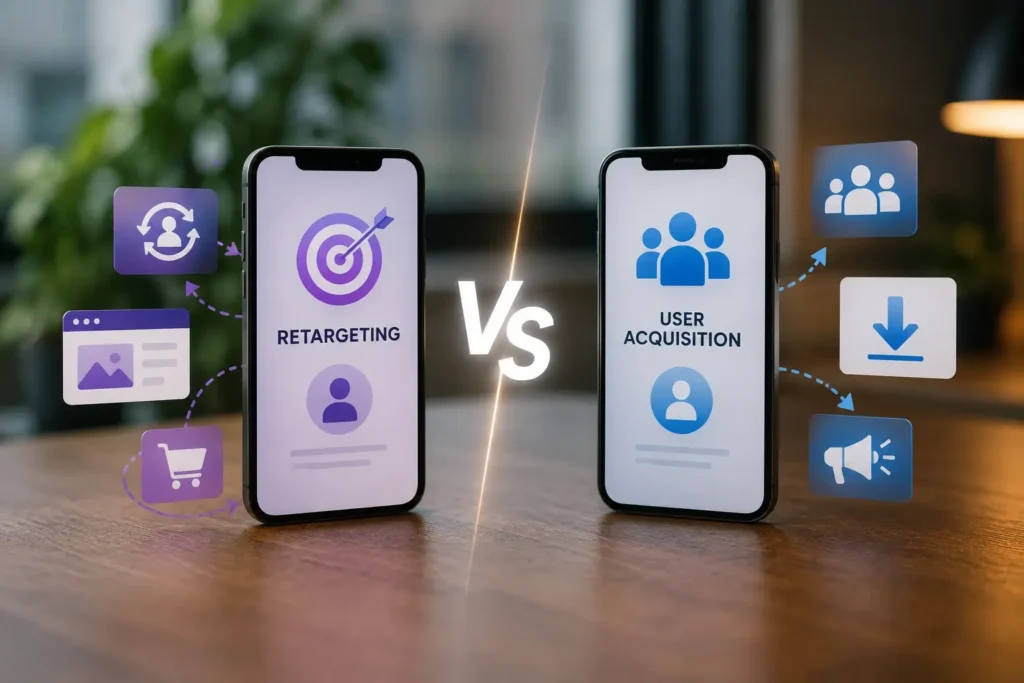
User acquisition campaigns target cold audiences who have never installed your app. Retargeting campaigns target existing or lapsed users who already have or once had your app.
The cost dynamics are very different. Retargeting users is typically more efficient than acquiring new ones because the audience already knows your product. You are resolving a friction point, not building awareness from zero.
Retargeting is one part of a broader mobile growth system. To understand where it fits alongside paid UA and organic growth, read our guide on ASO vs user acquisition.
How to Segment Your Audience for Retargeting
Audience segmentation is what separates effective retargeting from wasted spend. Generic retargeting campaigns that lump all lapsed users together perform poorly. Precise segments based on real in-app behavior perform consistently.
Here are the most effective segments by app category:
Ecommerce apps:
- Cart abandoners from the last 7 days highest ROAS segment
- Browse-but-did-not-buy users from the last 14 days
- Past purchasers who have not returned in 30 days.
Subscription apps:
- Users who completed onboarding but did not start a free trial
- Expired trial users who hit the paywall and bounced
- Active subscribers approaching renewal who show low engagement
Gaming apps:
- Users who stopped at a specific level
- High-spenders who have not logged in within 7 days
- Users who reached a monetization event but did not convert
Lookback windows matter here. Users who lapsed 7 to 14 days ago reconvert at roughly twice the rate of users who lapsed more than 30 days ago. The faster you retarget a lapsed user, the more likely they are to return.
Which Platforms Work Best for App Retargeting in 2026?
According to AppsFlyer’s 2026 Performance Index, Meta leads in retargeting power rankings globally, followed by Google Ads and specialized retargeting DSPs.
Meta (Facebook and Instagram)
Offers the strongest match rates because Meta owns the user identity graph. Its Advantage+ campaigns automate much of the retargeting optimization when you provide event-based custom audiences. The Meta Conversions API for apps also helps recover iOS post-install event data that the SDK alone misses after Apple’s App Tracking Transparency (ATT) changes.
Google Ads
Works well for apps with strong Android user bases. Android retargeting remains highly efficient because Google Advertising IDs (GAIDs) are still widely available. Android retargeting campaigns currently deliver CPAs that are 35 to 50% lower than equivalent iOS retargeting campaigns.
Remerge and Criteo
The leading independent DSPs for app retargeting, particularly for ecommerce apps that need dynamic product ads (DPAs) showing the exact items a user viewed or carted.
iOS vs Android Retargeting: What Changed After ATT
Apple’s App Tracking Transparency (ATT) framework changed iOS retargeting significantly. When users opt out of tracking and most do you lose access to their IDFA. This limits how precisely you can build and match retargeting audiences on iOS.
The practical result is that iOS retargeting now relies more on contextual signals, probabilistic matching and owned channels like push notifications and email for recently lapsed users.
Android retargeting is largely unaffected for now. Google’s Privacy Sandbox is coming, but as of mid-2026, GAID-based retargeting still works with high match rates on most Android devices. Smart teams are testing Google’s Protected Audiences API while GAID-based campaigns remain effective.
Frequency Capping and Lookback Windows
Two settings that most teams ignore until ROAS collapses.
Frequency capping:
Showing the same user more than three to four ad impressions per day degrades ROAS by 20 to 30%. Retargeting audiences are small by nature. Saturating them with repetitive creative causes ad fatigue fast. Set a daily frequency cap and rotate your creatives regularly.
Lookback windows:
This is the period during which a user’s actions count toward your retargeting audience. A 7-day lookback captures high-intent, recently lapsed users. A 30-day lookback broadens the audience but lowers conversion rates. Start with a 7 to 14-day window for your highest-value segments and test wider windows only after you have baseline data.
How Much Budget Should You Allocate to Retargeting?
Industry benchmarks from Singular’s mobile marketing expert data suggest starting with 20 to 30% of your total growth budget on retargeting, then adjusting based on your app’s lifecycle stage and audience size. Retargeting typically delivers a lower cost per acquisition (CPA) than cold user acquisition campaigns because the audience is already familiar with your product.
Apps with high churn in the first 30 days benefit most from retargeting. If users are dropping off during onboarding, retargeting them with a specific in-app incentive a free trial extension, a discount or a reminder of a feature they never used converts better than generic re-engagement ads.
Early-stage apps with small user bases should allocate less there is not enough audience volume to make retargeting cost-efficient. Growth-stage and mature apps with large lapsed user pools can allocate more and expect consistent returns.
A note on incrementality: always run holdout tests to measure true retargeting lift. Some users would have returned organically regardless of whether you showed them an ad. Without a holdout group, you cannot separate genuine retargeting lift from organic reactivation and you may be paying for conversions that would have happened anyway.
Retargeting and Owned Channels: Use Both
Paid retargeting is not your only re-engagement tool. Push notifications, email campaigns and in-app messages are free and often more effective for recently lapsed users who still have your app installed.
According to Braze’s 2025 Customer Engagement Review, combining owned channels with paid retargeting lifts reactivation rates by 30 to 40% compared to using either channel alone.
The right sequence: when a user lapses, try owned channels first push notifications and email. If they do not respond within 48 to 72 hours, move them into paid retargeting audiences. For users who have uninstalled the app entirely, paid retargeting is the only option.
Common Retargeting Mistakes That Drain Budget
No deep links in ads.
Sending retargeted users to your home screen loses most of them immediately. Every retargeting ad needs a deep link to the exact in-app destination that matches the creative.
No frequency cap.
Retargeting small audiences without a cap burns through budget fast and trains users to ignore your ads.
Ignoring conversion rates by segment.
Cart abandoners and expired trial users have very different intent levels. Mixing them into one campaign dilutes your budget and your creative relevance.
Not excluding converters in real time.
If a user completes the target action a purchase, a subscription, they need to be removed from retargeting audiences immediately. Continuing to serve them retargeting ads wastes budget and damages user experience.
Skipping incrementality testing.
Without a holdout group, you cannot know how much of your retargeting result is genuine lift. This is the single biggest measurement mistake in app retargeting.
How to Track Retargeting Campaign Performance
Your MMP tracks every retargeting-driven reinstall, deep link open and post-engagement in-app event. Attribution for retargeting is separate from user acquisition attribution, most MMPs handle this through dedicated re-engagement attribution windows.
Make sure your MMP is configured to report on re-engagement separately from new installs. If you are reading retargeting conversions inside your UA dashboard without segmentation, you are mixing two very different data sets and making poor optimization decisions.
Our mobile app user acquisition team in Dubai sets up and manages retargeting campaigns alongside full-funnel UA strategy for apps scaling across UAE, KSA and broader MENA.
Frequently Asked Questions
Yes, but it works differently than before. With most users opting out of IDFA tracking, iOS retargeting now relies on probabilistic matching, Meta’s Conversions API and owned channels for recently lapsed users. Android retargeting remains highly effective with device-level signal still largely intact. Teams that run a combined iOS and Android retargeting strategy with owned-channel layering see the strongest results in a post-ATT environment.
The terms are often used interchangeably, but there is a practical distinction. Remarketing typically refers to re-engaging users through owned channels like email, push notifications and in-app messages. Retargeting refers specifically to paid ads shown outside your app to lapsed or inactive users. Both aim at the same goal bringing users back but they use different channels and serve different segments based on whether the user still has the app installed.
Industry benchmarks suggest starting with 20 to 30% of your total growth budget on retargeting. The right split depends on your app lifecycle stage and lapsed user pool size. Early-stage apps with small user bases get better returns from acquisition spend. Growth-stage and mature apps with large lapsed audiences benefit from a higher retargeting allocation. Always run incrementality tests before scaling retargeting spend significantly.
Uninstalled users cannot receive push notifications or in-app messages. Paid retargeting is your only channel for reaching them. Your MMP detects uninstalls through silent push failures on iOS or uninstall tracking on Android. Once flagged, those users move into paid retargeting audiences. Serve them creative that directly addresses the reason they may have left price, features or complexity with a strong reason to reinstall.
According to AppsFlyer’s 2026 Performance Index, Meta leads globally for retargeting power, followed by Google Ads and specialized DSPs like Remerge. Meta works best for apps with broad consumer audiences. Google Ads works better for Android-heavy user bases. Remerge and Criteo suit ecommerce apps that need dynamic product ads. The best platform is the one where your users spend time and where your MMP has the strongest match rate.
Data from Adjust’s retargeting study shows retargeted users deliver 152% higher engagement rates compared to newly acquired users over 30 days. Day 1 and Day 7 retention rates are also consistently higher for retargeted users. The reason is simple retargeted users already understand your product. You are resolving a friction point, not building awareness from zero. That said, retargeting only works if you have a large enough lapsed user base. Early-stage apps should prioritize acquisition first, then layer in retargeting once the audience is large enough to generate meaningful campaign volume.
No, and this is one of the most common and costly mistakes in mobile retargeting. User acquisition creative is designed to drive a first install from someone who has never seen your app. Retargeting creative needs to speak to someone who already knows your product but stopped using it. The message, tone and call to action are entirely different. A lapsed payer responds to a discount or a new feature. A cart abandoner needs urgency and a direct path back to checkout. Recycling UA creative in retargeting campaigns consistently underperforms because the audience intent is fundamentally different.